How it works
A booking system has an awkward problem at its centre: the customer takes a slot off the market before anyone has paid for it, and the payment confirmation comes back later, from someone else's server. Everything below is built around that.
-
Browser
1. Customer picks a slot and submits
Name, email, phone, date and time go to an n8n webhook.
POST /webhook/demo-book-slot -
n8n
2. The slot is held immediately - before any money moves
Status flips available → pending. This is the part that is easy to miss and expensive to skip: without it, two people can be paying for the same 6:00 PM slot at the same time and you sell it twice.
The hold happens first. If the next step fails, the slot is already protected.
-
Square
3. A checkout is created
n8n calls
CreatePaymentLinkwith the line item and 8.25% tax. Square returns two things that matter:- url - the hosted checkout page. The customer is redirected here.
- order_id - written onto the slot record. Remember this one.
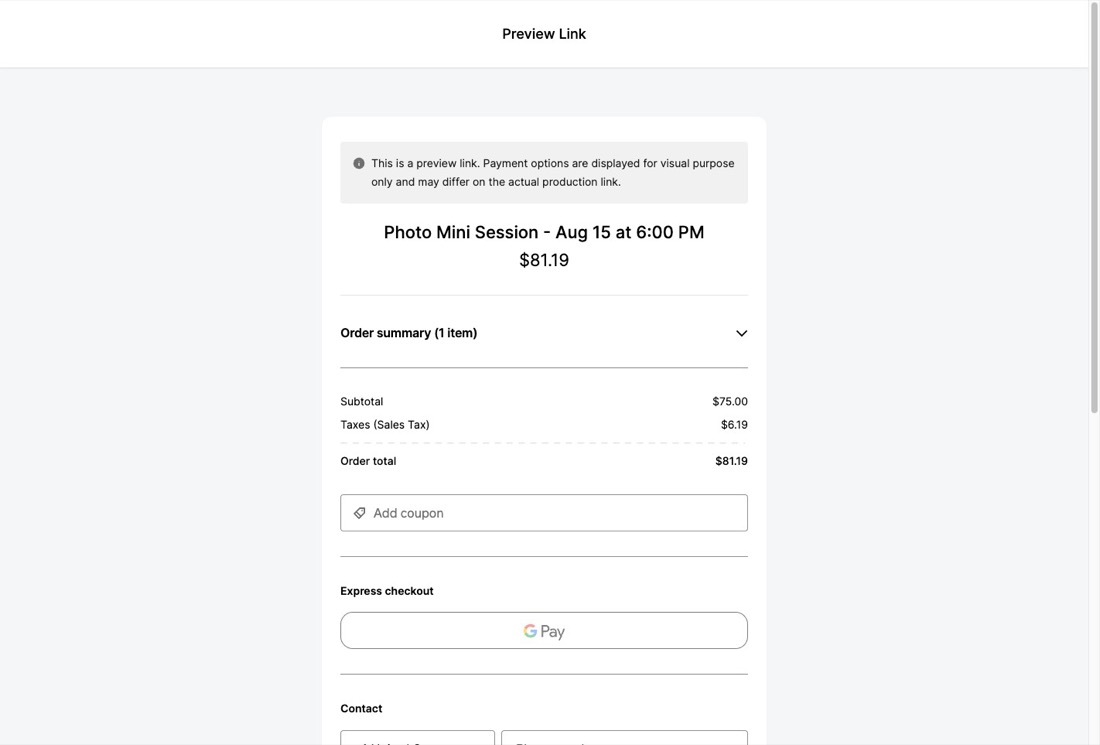
The Square-hosted checkout this system produces, rendered from a real order: the line item built by the workflow, $75.00 subtotal, 8.25% sales tax, $81.19 total. -
⋮From here the customer either pays, or they don't. Both paths have to be handled.
-
Paid
4a. Square calls back - minutes later, out of band
A
payment.updatedwebhook arrives at n8n. It does not know anything about slots or bookings. It carries an order_id.That is what the order_id was for. The system looks up the slot holding that id and flips it pending → booked. Without a correlation key stored at checkout-creation time, you cannot safely tell which reservation a payment belongs to.
-
Paid
5a. Confirmations go out
Customer email and an internal notification, built from the booking record.
-
Abandoned
4b. Nobody pays - and the slot is still held
The customer closes the tab. The card declines. Their kid starts crying. Nothing arrives from Square, so nothing tells the system to release the slot.
A scheduled sweeper checks for slots stuck on pending past a threshold, returns them to available, and deletes the dead Square payment link so it cannot be paid later for a slot someone else has since bought.
The threshold is a real trade-off. Too short and you pull a slot away from someone still typing their card number. Too long and abandoned carts sit on capacity you could have sold. Production uses 15 minutes.
It is switched off in this demo, deliberately. Releasing a slot also deletes its Square payment link - which kills the checkout page you are standing in front of, mid-sentence. Use Reset demo data on the admin view to put all 24 slots back.
Why the checkout page looks like a developer tool
This demo runs on Square's sandbox, so no real card is ever charged. Sandbox does not serve a real checkout page - it serves a Sandbox Testing Panel with a Test Payment button instead.
That panel shows the url Square returned. Clicking it takes you back to the
same panel, which looks broken but is not: in production that identical link opens the real
Square checkout with a card form. Same mechanism, different environment.
The panel's Preview Checkout button renders the genuine buyer-facing page from the same order - that is the screenshot above. Square labels it a preview because payment cannot be completed there; the totals, line item and tax are the live ones.
Nothing on this page is mocked. Every screen is Square's own, driven by a real sandbox order created by the workflow.
This ran for real
The demo above is generically branded and future-dated so the flow can be exercised. The system itself ran a real event: two days of mini sessions for a sports and events photography client in Laredo, sold and paid through this exact pipeline.